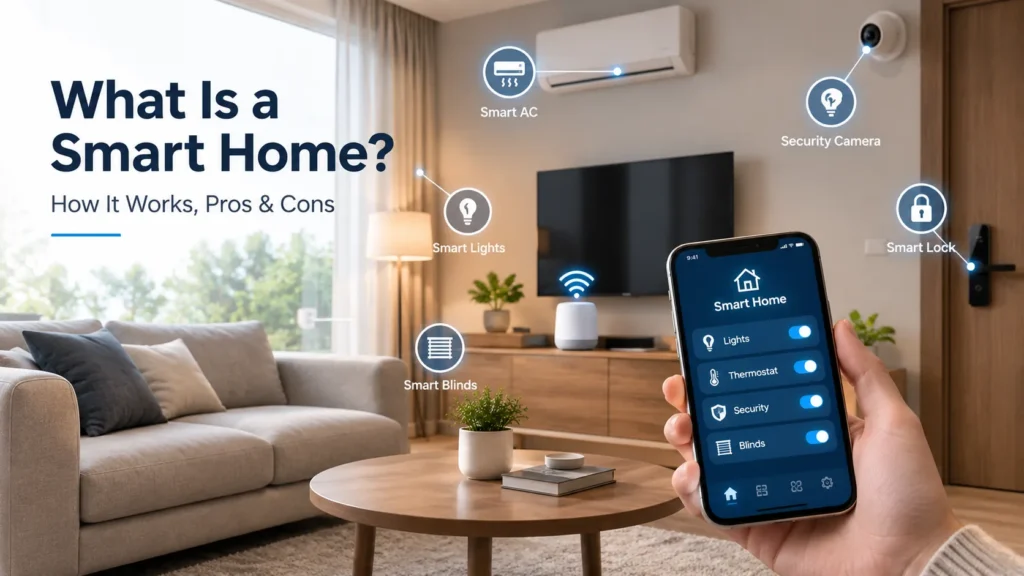
A smart home is a home where everyday devices connect to your home network and to each other. You control them from a smart home app or by voice. They also act on their own, based on rules you set.
Think of a normal home as a set of separate switches. A smart home links those switches together and gives them a brain.
In 2026, this is no longer a niche hobby. Parks Associates data shows about 45% of internet-connected U.S. households already own at least one core smart home device. Most people start with one product, like a video doorbell, and add more later.
This guide by homes Remedy explains how smart home technology works, what it really costs, where it falls short, and how to decide if it fits your life.
What Is a Smart Home?
A smart home uses connected devices to automate and remotely control parts of your house. These parts include lighting, heating, cooling, locks, cameras, and appliances.
Three things make a home “smart”:
- Connection. Devices join your home network and often reach the internet.
- Control. You manage everything from one smart home app, a voice assistant, or a wall panel.
- Automation. Devices react to time, sensors, or each other without you touching anything.
A single Wi-Fi bulb is a smart device. A house where that bulb turns on when a motion sensor sees you walk in is a smart home.
Smart homes are one branch of the Internet of Things (IoT). IoT simply means everyday objects that send and receive data over a network. Your home is the setting. The devices are the things.
Smart Home vs. Connected Home vs. Home Automation
People use these three terms as if they mean the same thing. They don’t.
| Term | What it means | Example |
|---|---|---|
| Connected home | Devices go online and you control them remotely | You tap your phone to turn off a lamp from work |
| Home automation | Devices follow rules and act without you | The lamp turns off at 11 p.m. every night |
| Smart home | Connected plus automated, and devices talk to each other | Your door lock tells the lights to turn on when you get home |
A connected home waits for you. A smart home acts for you. Most real setups sit somewhere in between.
How Does a Smart Home Work?
A smart home works in four layers: devices that sense and act, a network that carries the signals, a controller that runs the logic, and an app that puts you in charge.
Here is what each layer does.
1. Smart Devices and Sensors
Sensors are the eyes and ears. A motion sensor detects movement. A door sensor knows when a door opens. A temperature sensor reads the room. A water leak sensor spots moisture under the sink.
Other devices are the hands. Smart plugs cut power. Smart bulbs dim. Smart locks turn the bolt. Smart blinds pull themselves shut.
Every device reports its status back. That is what makes real-time monitoring possible.
2. Wireless Connectivity
Devices need a way to talk. Most use Wi-Fi, Bluetooth, Zigbee, Z-Wave, or Thread. Each has trade-offs, and the next section breaks them down.
Zigbee, Z-Wave, and Thread build a mesh network. In a mesh, each mains-powered device relays signals for its neighbors. Coverage grows as you add devices. Your Wi-Fi router stays free of clutter.
3. A Smart Home Hub or Controller
A smart home hub is the central controller. It translates between protocols, stores your automation rules, and keeps devices working together.
Popular hubs in 2026 include Amazon Echo speakers and displays, Google Nest speakers and displays, Apple HomePod and Apple TV, Samsung SmartThings, Aqara hubs, and Home Assistant for people who want full local control.
4. The Smart Home App
The app is your dashboard. You see device status, change settings, and build routines. Voice assistants sit on top of the same system, so a spoken command and a tap in the app do the same job.
How Automation Rules Actually Work
Almost every automation follows one simple shape:
When [trigger] happens, do [action], but only if [condition] is true.
Real examples:
- When the front door unlocks, turn on the hallway lights, if it’s after sunset.
- When the leak sensor gets wet, shut the water valve and send an alert.
- When everyone’s phone leaves the house, set the thermostat back 4°F.
- At 7:00 a.m. on weekdays, open the bedroom blinds and start the coffee maker.
Vendors call these routines, scenes, or automations. The logic is the same. Triggers can be a schedule, a sensor, your location, or another device’s action.
Does a Smart Home Need a Hub?
No, not always. Wi-Fi devices connect straight to your router and often work fine on their own.
You do need a hub if:
- You use Zigbee, Z-Wave, or Thread devices, which need a hub or border router to join your network.
- You want automations to keep running when your internet drops.
- You want to mix brands under one roof.
Many smart speakers now double as hubs, so you may already own one without realizing it.
Do Smart Homes Need Wi-Fi?
You need a home network. You don’t always need the internet.
Local control means the hub processes rules inside your house. A Zigbee or Thread motion sensor can still switch on a light during an outage. Cloud connectivity means the command travels to a company’s server and back. That breaks when your connection drops.
Before you buy, check whether a device works locally. This one detail decides how your home behaves on a bad network day.
Smart Home Protocols: Wi-Fi, Zigbee, Z-Wave, Thread, and Matter
Protocols are the languages smart devices speak. Picking the right mix prevents most compatibility headaches.
| Protocol | Best for | Needs a hub? | Trade-off |
|---|---|---|---|
| Wi-Fi | Cameras, TVs, big appliances | No | Uses more power, crowds your router |
| Bluetooth | Setup, locks, trackers | Sometimes | Short range |
| Zigbee | Bulbs, sensors, plugs | Yes | Shorter hops, 2.4 GHz crowding |
| Z-Wave | Locks, sensors, switches | Yes | Fewer device choices, higher prices |
| Thread | Battery sensors, locks, bulbs | Border router | Newer, still maturing |
| Matter | Cross-brand compatibility | Depends | An app layer, not a radio |
Matter vs. Zigbee vs. Z-Wave
This comparison confuses people because it mixes two different things.
Zigbee and Z-Wave are radio protocols. They define how signals travel through the air.
Matter is not a radio. Matter is a shared language that rides on top of Wi-Fi, Thread, or Ethernet. The Connectivity Standards Alliance built it so devices from different brands can work in the same app.
In plain terms: Zigbee and Z-Wave decide how a message moves. Matter decides what the message means.
Matter fixes cross-brand compatibility. Zigbee and Z-Wave still power huge numbers of reliable, cheap sensors. Many hubs bridge older Zigbee and Z-Wave gear into Matter, so you rarely have to throw anything away.
Wi-Fi vs. Thread
Wi-Fi is fast and already in your house. It suits cameras and anything that streams video. It drains batteries quickly, and 40 Wi-Fi bulbs will strain a home router.
Thread sips power and forms a self-healing mesh. A Thread sensor can run a year or more on a coin cell. Thread needs a border router, which most new smart speakers and displays now include.
A practical rule: use Wi-Fi for high-bandwidth devices, Thread or Zigbee for small battery sensors.
Matter and Thread in 2026 | Where Things Actually Stand
The standard moved fast over the past two years.
- Matter 1.4 (late 2024) added energy hardware: EV chargers, heat pumps, solar, batteries, and water heaters.
- Matter 1.5 (late 2025) added cameras, video doorbells, intercoms, closures, and soil sensors.
- Matter 1.5.1 (March 2026) improved camera streaming and doorbell behavior.
- Matter 1.6 (June 2026) added tap-to-setup with NFC, a cross-ecosystem sharing feature called Joint Fabric, and an updated security certification.
- Thread 1.4 became the required version for newly certified border routers starting January 2026.
One caveat matters more than any version number. A feature can exist in the specification long before your app supports it. Samsung SmartThings usually adopts new versions first. Apple Home follows. Others lag. So “Works with Matter” on a box tells you less than checking your own platform’s current support list.
Common Smart Home Devices
Here are the categories most homeowners actually buy, and what each one solves.
Lighting and Power
- Smart bulbs change brightness and color, and cost the least to try.
- Smart switches replace the wall switch, so the light still works normally for guests.
- Smart plugs turn a lamp, fan, or heater into a connected device for very little money.
Smart switches beat smart bulbs in rooms where people flip switches out of habit. A smart bulb switched off at the wall loses power and stops responding.
Climate Control
- Smart thermostats learn your schedule and adjust heating and cooling on their own.
- Temperature and humidity sensors let the thermostat respond to the room you’re actually in.
Security and Safety
- Smart locks allow keyless entry, guest codes, and remote unlocking.
- Video doorbells show who is at the door and record visitors.
- Security cameras cover indoor and outdoor areas.
- Motion sensors and door sensors trigger alerts and automations.
- Smart smoke detectors send phone alerts, not just a beep you can’t hear from work.
- Water leak sensors catch a slow leak before it ruins a floor.
Appliances and Comfort
- Smart TVs and speakers handle entertainment and voice control.
- Smart refrigerators, ovens, and washing machines send status alerts and can delay cycles to off-peak hours.
- Smart blinds and curtains open on a schedule or block afternoon heat.
Water and Outdoors
- Smart irrigation controllers skip watering when rain is forecast.
- Smart valves shut off the main water line when a sensor detects a leak.
Start with the problem, not the product. A leak sensor under the water heater costs about $20 and can prevent thousands of dollars in damage. A smart fridge rarely changes anyone’s day.
What’s New in Smart Homes in 2026
Five shifts define this year.
1. Voice assistants became conversational. Amazon’s Alexa+ and Google’s Gemini for Home replaced rigid command grammar with large language models. You can now say “it’s too bright in here” instead of learning the exact phrase for each light group. Apple has not shipped an equivalent overhaul.
2. The best AI now costs money. Amazon launched Alexa+ at $19.99 per month in the U.S. in February 2026, included at no extra cost for Prime members. Google keeps basic Gemini for Home features free, with advanced features behind Google Home Premium. Voice control used to be a free feature. Increasingly, the smartest version is a subscription.
3. Cameras joined the open standard. Matter 1.5 brought cameras and doorbells into the spec. Over time, this should let you see feeds from different brands in one app instead of juggling four.
4. Security labeling arrived, slowly. The FCC named the ioXt Alliance as lead administrator for the U.S. Cyber Trust Mark in April 2026. The program is voluntary and still ramping up, so few products carry the label yet. In the EU, the Cyber Resilience Act takes the opposite approach and makes security requirements mandatory, with obligations phasing in through 2027.
5. Energy management became the fastest-growing category. Utilities now pay households to let smart thermostats shift usage during peak demand. Combined with EV chargers and home batteries entering the Matter spec, the home is turning into a small energy system.
Benefits of a Smart Home
Convenience and Time Savings
Routines remove small daily chores. One “goodnight” command locks the doors, turns off lights, and sets the thermostat back. Those saved minutes add up across a year.
Energy Efficiency and Lower Bills
This is the benefit people ask about most, so here are honest numbers.
ENERGY STAR data shows certified smart thermostats cut heating and cooling costs by roughly 8%, or about $50 a year for a typical household. The U.S. Department of Energy says consistent temperature setbacks can save up to 10%. Manufacturers often advertise 15% to 23%. Those higher figures come from company marketing, not independent testing.
Add smart plugs, automated lighting, and schedules, and total household savings land in the 10% to 15% range, according to DOE and NREL estimates. Real savings depend on your climate, your insulation, and your old habits. If you already turn the heat down at night, a smart thermostat will save you less.
Home Security and Peace of Mind
Cameras, locks, and sensors give you remote monitoring from anywhere. You can check whether you locked the door, see a delivery arrive, and get an alert when a window opens at 2 a.m. Security ranks as the top purchase reason in most consumer surveys.
Safety
Smart smoke detectors and leak sensors are the highest-value, lowest-cost devices in the whole category. A phone alert reaches you when a loud beep can’t.
Accessibility
Voice control and automation genuinely help people with limited mobility or vision. Lights, doors, blinds, and thermostats all become reachable without standing up. For older adults living alone, motion and door sensors let family check in without intruding.
Resource Management
Smart irrigation waters your lawn only when the soil and forecast justify it. Leak detection stops water damage early. Both cut waste and cost.
Drawbacks of a Smart Home
An honest guide has to cover these.
High Upfront Cost
Good devices are not cheap. A quality smart lock, thermostat, and doorbell together can pass $700 before you add anything else. Cheap devices often mean cheap apps and short support windows.
Subscription Fees
This is the cost people underestimate. Camera cloud recording, advanced AI assistants, and pro monitoring all charge monthly. Three subscriptions at $10 each add up to $360 a year, every year. Always check what a device does without a subscription.
Internet and Wi-Fi Dependency
Cloud-dependent devices become dumb objects during an outage. Weak Wi-Fi at the edges of a house causes dropouts that feel like broken hardware.
Compatibility Issues and Multiple Apps
Matter improves this, but the problem is not solved. Support varies by platform and by device. Many people still run four apps for one house.
Technical Complexity and a Learning Curve
Setup is easy. Reliable automation is not. Getting motion lighting to behave in a hallway takes tuning. Not everyone enjoys that.
Maintenance and Device Replacement
Batteries die. Firmware needs updating. Companies discontinue products and shut down servers, which can turn a working device into scrap. This is the risk of buying cloud-tied hardware from small brands.
Vendor Lock-In
Once you own twelve devices in one ecosystem, switching gets expensive. Choose your main platform carefully, and favor devices that work locally or across ecosystems.
System Failure Points
A single hub failure can take the whole house offline. Keep manual overrides. Never install a lock or garage door you cannot open by hand or key.
Smart Home Security and Privacy
Smart home security deserves its own section. The risks are real and the fixes are simple.
The Actual Risks
Every connected device widens your attack surface. Research from NETGEAR and Bitdefender across millions of households found that connected homes face close to 30 IoT attack attempts a day across an average of about 22 devices.
Most attacks are not targeted at you. Automated scanners hunt for devices with default passwords and old firmware. A compromised bulb can become a doorway into your wider home network.
The three genuine threats:
- Unauthorized access to cameras, locks, or the network itself.
- Data collection you didn’t expect. Devices log when you wake, when you leave, and what you say.
- Abandoned devices that stop receiving security updates but keep running.
How to Secure Your Smart Home
Do these eight things. They cover most of the risk.
- Change every default password. Use a unique, strong password per account.
- Turn on multifactor authentication for your hub, camera, and lock accounts. This is the single highest-value step.
- Update your router firmware and replace routers older than about five years.
- Put smart devices on a separate network. Most modern routers offer a guest or IoT network. This stops a weak bulb from reaching your laptop.
- Enable automatic firmware updates on every device that offers them.
- Buy from brands that publish a support window. Check how long they promise security updates.
- Prefer local control for locks, sensors, and lighting. Fewer cloud round-trips mean fewer exposure points.
- Review app permissions and data settings after every major app update. Defaults change.
Data Privacy
Voice assistants and cameras collect a lot. In 2026, the trade-off got sharper: AI assistants need context to be useful, and context means data.
Amazon drew criticism during the Alexa+ rollout for removing an option that stopped voice recordings from going to the cloud. Survey data shows privacy worries rise sharply when AI enters the picture, and most consumers say clear disclosure would make them more willing to adopt these features.
Practical steps: mute microphones when you want privacy, delete voice history on a schedule, point indoor cameras away from bedrooms, and read what a company does with footage before you subscribe.
How Much Does a Smart Home Cost in 2026?
Costs vary widely. Here are realistic mid-2026 U.S. ranges.
| Device | Typical price |
|---|---|
| Smart plug | $10–$25 |
| Smart bulb | $10–$50 |
| Smart switch | $20–$60 |
| Water leak sensor | $15–$40 |
| Motion or door sensor | $15–$40 |
| Smart speaker or display | $30–$230 |
| Smart hub | $60–$150 |
| Smart thermostat | $80–$300 |
| Video doorbell | $60–$230 |
| Security camera | $30–$200 |
| Smart lock | $110–$350 |
| Smart blinds (per window) | $150–$450 |
Three common budgets:
- Starter setup ($150–$400). A smart speaker, a few plugs and bulbs, and two leak sensors. Enough to learn what you actually use.
- Solid mid-range ($800–$2,500). Hub, thermostat, smart lock, doorbell, two cameras, lighting in main rooms, sensors throughout.
- Whole-home system ($5,000–$25,000+). Professional installation, in-wall keypads, motorized shades, whole-house audio, integrated security.
Ongoing costs to budget for:
- Camera cloud storage: $3–$15 per month
- Professional security monitoring: $20–$60 per month
- AI assistant subscriptions: roughly $10–$20 per month
- Battery and device replacement: $50–$150 per year
DIY vs. Professional Installation
Choose DIY for plugs, bulbs, sensors, cameras, doorbells, and most thermostats. These take minutes and need no tools beyond a screwdriver.
Hire a professional for mains wiring, especially switch boxes with no neutral wire. Do the same for motorized shades, structured cabling during a renovation, or any whole-house system you want someone else to support. Expect installation labor to add several hundred dollars for a moderate setup.
Wired vs. Wireless
Wireless wins for existing homes. It costs less, installs faster, and moves with you.
Wired wins during construction or a full renovation. It’s more reliable, doesn’t need batteries, and adds more to resale value than wireless kit does. If your walls are already open, run the cable.
How to Build a Smart Home: A Step-by-Step Plan
Step 1: Name the problem. Write down three annoyances. “The porch is dark when I get home.” “I worry about the water heater.” Solve those first.
Step 2: Fix your network. Weak Wi-Fi causes more smart home failures than bad devices. Upgrade to a mesh router if you have dead zones.
Step 3: Pick your ecosystem. Choose Amazon Alexa, Google Home, Apple Home, or Samsung SmartThings based on the phones and speakers you already own. This choice shapes everything after it.
Step 4: Start small and cheap. Buy two smart plugs and a leak sensor. Live with them for a month.
Step 5: Secure it immediately. Set strong passwords and turn on multifactor authentication before you add a third device.
Step 6: Build one automation you’d miss. A single routine that saves you a daily chore teaches you more than ten devices sitting idle.
Step 7: Expand deliberately. Add devices only when you can name the automation they enable. Check Matter or platform compatibility before every purchase.
What to Consider Before Building a Smart Home in 2026
Run through this list before you spend anything.
- Do you rent or own? Renters should stick to plugs, bulbs, sensors, and cameras. Skip anything that needs wiring changes.
- How reliable is your internet? Frequent outages mean you should prioritize local-control devices.
- Who else lives here? Everything must work for the least technical person in the house. Keep physical switches functional.
- What’s your yearly budget, not your one-time budget? Add up subscriptions before you buy.
- How long will this brand support the device? Check the published support window.
- Does it work without the cloud? This matters most for locks and security.
- Are you planning a renovation? If yes, wire now. You will not get another easy chance.
- How much complexity do you actually want? There is no rule that says you must automate everything.
Is a Smart Home Worth It in 2026?
For most homeowners, a focused smart home is worth it. A full one usually isn’t.
A smart home is likely worth it if you:
- Own your home and plan to stay several years
- Have a specific problem to solve, like security, energy costs, or accessibility
- Have reliable internet and decent Wi-Fi coverage
- Enjoy setting things up, or have someone in the house who does
You should probably wait if you:
- Rent short-term
- Have unstable internet
- Want everything automated on day one with no learning curve
- Would resent monthly fees on top of hardware costs
- Live with people who would find app-controlled lights frustrating
The strongest value sits at the cheap end. Leak sensors, smart smoke detectors, a thermostat, and a doorbell deliver real safety and savings for a few hundred dollars. Smart fridges and motorized curtains are comfort purchases. Both are fine. Just know which one you’re buying.
Frequently Asked Questions
How does a smart home work? Devices connect to your home network, report their status, and follow rules stored on a hub or in the cloud. You control them through an app or by voice, and automations run without you.
Do smart homes need Wi-Fi? They need a home network. Devices using Zigbee, Z-Wave, or Thread with a local hub keep working during an internet outage. Cloud-only devices stop working.
Does a smart home need a hub? Not always. Wi-Fi devices work without one. You need a hub for Zigbee, Z-Wave, or Thread devices, for local automations, and for mixing brands smoothly. Many smart speakers include hub functions.
Can smart devices from different brands work together? Increasingly, yes. Matter was built for exactly this. Support still varies by platform, so check your specific ecosystem’s compatibility list before buying.
Are smart homes secure? They can be. Most breaches exploit default passwords and outdated firmware, not clever hacking. Strong unique passwords, multifactor authentication, automatic updates, and a separate IoT network handle most of the risk.
Can smart homes save energy? Yes, modestly. ENERGY STAR puts smart thermostat savings near 8% of heating and cooling costs, roughly $50 a year. Full smart energy setups reach 10% to 15%. Treat any claim above 20% with caution.
Can I make my existing home smart? Yes. Almost every device on this list is designed for retrofit. Smart plugs, bulbs, sensors, cameras, doorbells, and thermostats all install without construction work.
What’s the difference between Matter and Zigbee? Zigbee is a radio protocol that carries signals. Matter is a shared language that runs over Wi-Fi, Thread, or Ethernet so different brands can understand each other. They solve different problems.
How much does a basic smart home cost? A useful starter setup runs $150 to $400. A well-equipped home runs $800 to $2,500. Professional whole-home systems start around $5,000.
The Bottom Line
A smart home is not one purchase. It’s a series of small decisions that either solve real problems or fill drawers with gadgets.
The technology has matured a lot. Matter has made cross-brand setups genuinely workable. AI assistants finally understand normal speech. Energy features moved into the open standard. Security labeling is on the way.
What’s left is honest friction: uneven platform support, subscription creep, and the ongoing need to maintain what you install.
So use a simple test before every purchase. Name the annoyance you’re removing, name the automation that removes it, and check the yearly cost including any subscription. If you can answer all three, buy it. If you can’t, you’re buying a gadget, not a smart home.
Start with a leak sensor and a smart plug. Give it a month. Your own experience will tell you more than any buying guide, including this one.